Velo AI: Can It Really Generate Weeks of Testing in Minutes?
I took Velo.AI for a spin to see if it lives up to its bold claim that it can “generate weeks of testing work in minutes.” Spoiler alert — it has got potential, but it’s not quite the silver bullet (yet).
Evaluation Approach
To give this a fair shot I used Strava as an example as it has an open API specification and is used among hobbyists as well as having some complex functionality. Supporting mocked artifacts including requirements documentation and architecture diagrams were generated using Copilot and fed into Velo AI as inputs. This allowed for a realistic simulation of the tool’s workflow in a typical modern development environment.
What It Does Well
Requirements Validation Surprisingly solid. It flagged 19 gaps from vague prompts I provided and even suggested technical formats like GeoJSON and GeoJSON LineString which left me impressed. This can translate to a saving in time for devs and QAs alike on Spikes.
Test Scenario Generator 93 scenarios generated in about a minute? Impressive. Covered boundary and negative testing, performance, edge cases, and risk-based testing. They still required manual work to expand them.
This feature provides value by:
Supporting legacy system analysis, where existing test assets may be incomplete, outdated, or undocumented Supplementing exploratory or regression testing with additional test perspectives that may catch overlooked edge cases. The auto-generation capability reduces manual effort, promotes test standardization, and could enhance onboarding for new testers or test leads by giving them a clear, automated view of what needs coverage. This is useful in large or distributed teams where test design quality may not be consistent.
API Test Case Creation
Generated solid test cases from OpenAPI specification. Covered boundary, security, and performance — ideal for fast-paced teams.
From a business standpoint, this functionality offers value
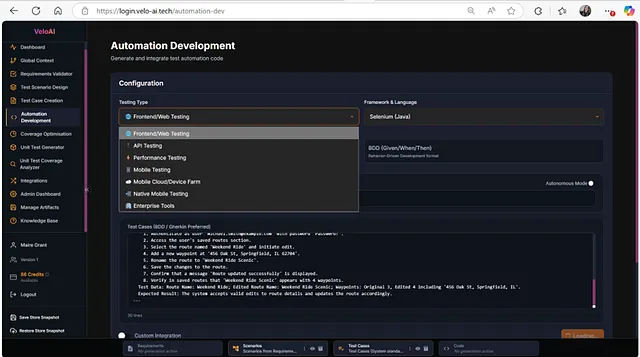
Accelerating test design for APIs where documentation exists but test coverage is not yet built Automation Scripting Supports Selenium, Playwright, Appium, JMeter, and more. Great for stubbing out frameworks or quick proof-of-concept pieces.
The tool clearly would be capable of selecting multiple test cases and scenarios from the bottom bar and pulling through to write a lot of unit tests at one time but this doesn’t necessarily save time by the time they are ported, pulled into the code base, tweaked and edited if needs be. It saves a lot of time, yes — but there are other tools that can be integrated into the IDE that would provide more of a time saving by removing the need to port code in and out of a tool.
Competing solutions embedded directly into IDEs (e.g., GitHub Copilot, CodeWhisperer, or JetBrains tools) may offer greater real-time productivity gains, particularly in mature development pipelines.
What I did like was the range of testing including mobile and performance testing — the ability to generate performance test scripts for JMeter. Gatling and mobile testing offerings for Appium and Android and iOS mobile native testing on top of the usual suspects Selenium, Playwright, Cypress and REST Assured for API Testing.
This is something that could be used to stub tests for framework selection from getting a barebones project up and running with a specific purpose, it could save time, you could do a lot even with the free trial especially as it is not time limited.
From a strategic QA perspective, this breadth allows test teams to:
Rapidly prototype and evaluate automation frameworks for different platforms Stub out baseline automation projects to accelerate implementation timelines Explore performance and mobile testing use cases without deep upfront setup For teams evaluating frameworks or building proof-of-concept automation suites, this capability can reduce setup time and improve ROI on resource-constrained projects. The absence of a time limit on the trial version allows testers to explore this functionality before committing to adoption.
Room For Improvements
UI & Workflow
Clunky in places. Artifacts section disappeared between sessions, and exporting code was a bit of a pain.
Test Case Maintenance
More tests ≠ better tests. High volume might mean high maintenance.
Unit Testing
Decent starter code, but lacks IDE integration — GitHub Copilot still wins here.
Test Automation Scripting
Code export is manual and fragmented -users must download individual files or copy/paste code snippets from the read-only, line-limited code viewer. There is no option to download a .zip folder and lack of this introduces unnecessary sticking points for integration into CI/CD pipelines and local IDEs.
No in-browser editing reduces efficiency that could be leveraged customizing generated scripts before exporting them.
Business Value?
Speed-to-Test Yes, especially for new features or weak requirements.
Standardization
Can help align test strategy across teams.
Cost Efficiency
Maybe — if used strategically and not as a crutch. I used the free trial with credits and it was open use allowing me to use all the functionality — free trials as they should be — giving free reign.
Strategic Positioning and Tooling Landscape
Velo AI enters a crowded space of AI-powered test generation tools like BrowserStack, Testim, and Tricentis — all leveraging similar OpenAI-based tech. While its core capabilities aren’t unique algorithmically, Velo AI aims to stand out by:
Streamlining workflows (though not always smoothly)
Optimizing prompts for domain-specific testing Consolidating multiple testing functions to reduce context switching That said, similar results could be achieved using in-house or open-source LLMs at lower cost, especially if your team already uses approved tools with scripting capabilities.
Key Takeaways
Out of all the features of this tool I found the test automation scripting the most valuable for productivity and speed-to-value as a supplementary tool for moving fast and supporting manual testers moving towards automation.
Without getting into the whole “vibe coding” movement; tools like this are useful but shouldn’t replace understanding the fundamentals of writing code.
My concern would be that if we dropped tests written this way into a framework and the logic of how they work isn’t understood by those maintaining these tests long term leading to longer debugging time — this needs to be weighed into the true time saving cost-benefit and any savings may be offset.
An application I can see this being useful is for multi browser and device support, having the same set of tests and needing it written in another flavour or syntax e.g for both web testing and mobile testing requirements — spitting out and translating the same tests without having to context switch between coding syntax and losing time there.
A team combining this functionality with foundational knowledge and coding standards would likely see greater returns, as opposed to teams that treat it as a plug-and-play solution. Velo AI’s automation scripting offers value when used strategically as a catalyst for delivery speed and cross-platform efficiency but not as a replacement for skilled development practices. For best results, it should be integrated into automation initiatives focusing on maintainability, team enablement, skills, long-term scalability and sustainability.
Verdict
Velo AI is a solid toolkit for testers who know their craft and want a boost but not a replacement. Use it at project kick-off, during refinement, or when scoping out automation frameworks. Don’t expect this or any market tool to replace your intuition or experience.
So, yes — Velo AI really can generate weeks of testing (assistance) in minutes but it is up to us to oversee the quality of the output and use the tool to maximise efficiency.
My Scoring
Ease of use rating — 6/10 Intuitiveness — 5/10 Value rating — 6.5/10 Features and Functionality Rating — 7/10
Overall Score: 6/10
Great for experimentation. Worth a trial to see if you or your team finds value. Just don’t forget your critical thinking hat! 🎩✨🕹️